Pass value from one scene to other in iOS app using Swift

Code of ViewController (code of file from where you want to pass value):

import UIKit

class ViewController: UIViewController {

    @IBOutlet weak var txt1: UITextField!
    override func viewDidLoad() {
        super.viewDidLoad()
       
    }

    override func didReceiveMemoryWarning() {
        super.didReceiveMemoryWarning()
      
    }

    @IBAction func ClickToPass(_ sender: Any) {
        let mmi  = self.storyboard?.instantiateViewController(withIdentifier: "Second") as! SecondViewController
       
        mmi.passedvalue = txt1.text!
        self.navigationController?.pushViewController(mmi, animated: true)
    }
    

}


Code of SecondViewController (code of file where you want to get value):

import UIKit

class SecondViewController: UIViewController {

    @IBOutlet weak var label1: UILabel!
    var passedvalue = String()
    override func viewDidLoad() {
        super.viewDidLoad()

        label1.text = "Passed value= " + passedvalue
    }

    override func didReceiveMemoryWarning() {
        super.didReceiveMemoryWarning()
        // Dispose of any resources that can be recreated.
    }
}


Screenshots:


Develop an iPhone application that convert birth date into year, month and days in swift.

Code:

ViewController.swift:


import UIKit

class ViewController: UIViewController {

    @IBOutlet weak var lblday: UILabel!
  
    @IBOutlet weak var view1: UIView!
    @IBOutlet weak var lblmonth: UILabel!
    @IBOutlet weak var lblyear: UILabel!
    @IBOutlet weak var txtdate: UITextField!
    override func viewDidLoad() {
        super.viewDidLoad()
        view1.isHidden = true
    }

    @IBAction func btnClicked(_ sender: Any) {
        view1.isHidden  = false
        let dateFormatter = DateFormatter()
        dateFormatter.dateFormat = "dd/MM/yyyy"
        let date = dateFormatter.date(from: txtdate.text!)
        let NumOfDays: Int = daysBetweenDates(startDate: date!, endDate: Date())
        let year = NumOfDays/(365)
        let month =  (NumOfDays - (year * 365))/30
        let days = NumOfDays - (year * 365 + month * 30)
        lblyear.text = "\(year)"
        lblmonth.text = "\(month)"
        lblday.text = "\(days)"
    }
    func daysBetweenDates(startDate: Date, endDate: Date) -> Int {
        let calendar = Calendar.current
        let components = calendar.dateComponents([Calendar.Component.day], from: startDate, to: endDate)
        return components.day!
    }
    override func didReceiveMemoryWarning() {
        super.didReceiveMemoryWarning()
        // Dispose of any resources that can be recreated.
    }
}

Result:


Write a program in swift to check the number is palindrome or not.

      Code:

import UIKit

var reversen = 0
var rem = 0
var n = 142
var no = n
no=n

while n != 0 {
    rem = n%10
    reversen = reversen * 10 + rem
    n /= 10
}
if(no == reversen)
{
    print("\(no)" + " is pelindrome")
}
else
{
    print("\(no)" + " is  not pelindrome")
   
}

Result:


Write a program in swift to check the number is even or odd.

      Code:

import UIKit

var n = 28 // enter your number here

if(n%2==0)
{
    print("\(n) is even number.")
}
else
{
    print("\(n) is odd number.")
   
}

Result:


Check the given number is perfect number or not in swift 3.0


Code:

import UIKit

var n = 28
var temp = n
var sum = 0

for i in 1 ... n-1
{
    if(n%i==0)
    {
        sum = sum + i
    }
}
if(sum == temp)
{
    print("\(temp) is perfect number.")
}
else
{
     print("\(temp) is not perfect number.")

}


Result:


Find Factors of given number in swift 3.0

Code:
import UIKit

var n = 12

print("Factors of \(n) are:\n")
for i in 1 ... n
{
    if(n%i==0)
    {
        print("\(i) " )
    }

}

Result:


Sample demo application with text Field, button and label in swift 3.0


Here we are going to create simple iPhone app in iPhone with the help of  text Field, button and label.

We have to make a simple app in which we have to show the content of textfield (entered by user into uitextfield) into label when user taps on button.

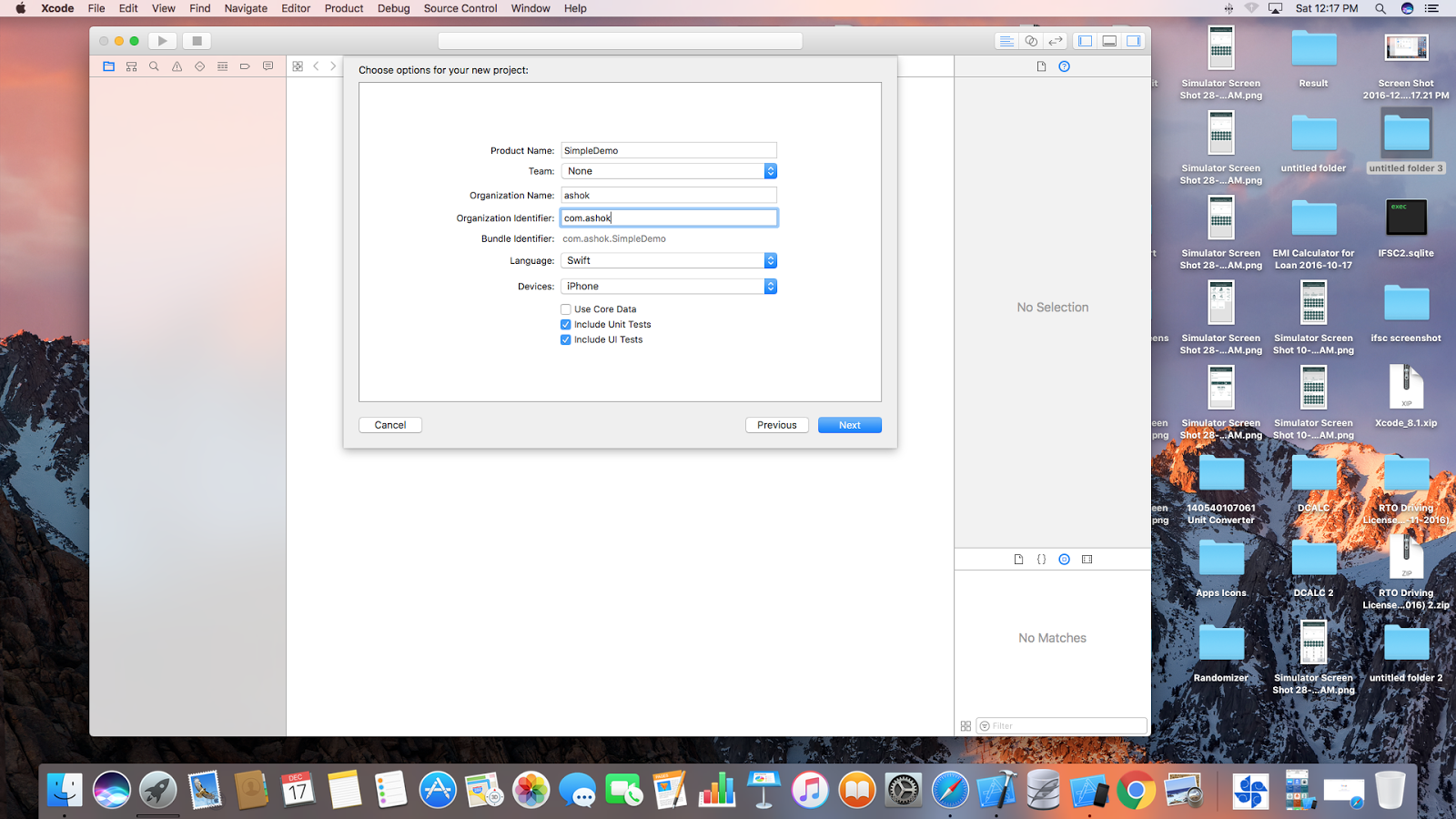
First open your Xcode (i am using Xcode 8.1 here). When you open your Xcode it will ask to create new project or open a created project. choose your option.

I am choosing to create new project.

The next screen will open when you choose to create new project.

It will look like given below screen:


Then select for single view application from opened screen. It will show screen like given here:


Fill your Product name, Organisation name, organisation identifier, etc.
And then click next here. Then select the location where you have to store your project. This screen look like below screen:


And then it will show your project screen. Make design as shown in below screen in your storyboard ViewController:


Then take outlet of uitextfield  and label from storyboard and gives it name txt1 and lblresult respectively.

And also generate action of uibutton with name ClickButton.

Now we have to code it according to our requirement. I have to show the content of textfield into label when user click on button.

The whole code of Viewcontroller.swift is given here. :

import UIKit

class ViewController: UIViewController {

    @IBOutlet weak var lblresult: UILabel!
    @IBAction func ClickButton(_ sender: Any) {
        
        lblresult.text = txt1.text
    }
    override func viewDidLoad() {
        super.viewDidLoad()
        // Do any additional setup after loading the view, typically from a nib.
    }
    @IBOutlet weak var txt1: UITextField!

    override func didReceiveMemoryWarning() {
        super.didReceiveMemoryWarning()
        // Dispose of any resources that can be recreated.
    }

}

The whole screen of Xcode after coding is shown here:


Now your app is ready to run. Build and run your project. Choose the device iPhone 5s to run. The screenshot is given here when it runs on simulator:

Check the number is prime or not in swift 3.0

//code

import UIKit

var flag=0
var n = 13

var i = 2
for i in 2 ... n-1
{
    if(n%i==0)
    {
        flag = 1;
        break;
    }
}

if(flag==1)
{
    print("\(n)" + " is not prime")
}
else
{
    print("\(n)" + " is  prime")

}


Result:


C program to check number is prime or not


#include

void main()
{
int i,j,flag=0,n;
printf(“enter any number\n”);
scanf(“%d”,&n);

for(i=2;i
{
if(n%i==0)
{
flag = 1;
break;
}
}

if(flag==1)
{
printf(“%d is not prime\n”,n);
}
else
{
printf(“%d is a prime number\n”,n);
}

}

MATLAB code to decode all the received words for (n,k) linear block code.

Code:


clc;
clear all;
close all;
n=input('enter the code digits');
k=input('enter the data digits');
p=input('enter the parity matrix it must bei k rows and m coloums'); disp(p)
z=input('enter 1 for systmetic and 0 for nonsystmetic');
msg=[];
for i=0:2^k-1
    msg=[msg;de2bi(i,k,'left-msb')];
end
if z==1
  %p=[1 0 1;0 1 1;1 1 0];
  i=eye([k k])
  g=[i p]
else
  g=input('enter the generator matrix in k*n '); 
end   
code =rem(msg*g,2)

decmsg=decode(code ,n,k,'linear',g)